WatchOut #7 · Investigating
Fake printer support pages offer remote access
Website Advertisement Technology & workplace scamsImpersonation
Who may be targeted: People looking for printer setup or support, especially anyone who reaches an unexpected printer-help page.
What we are seeing
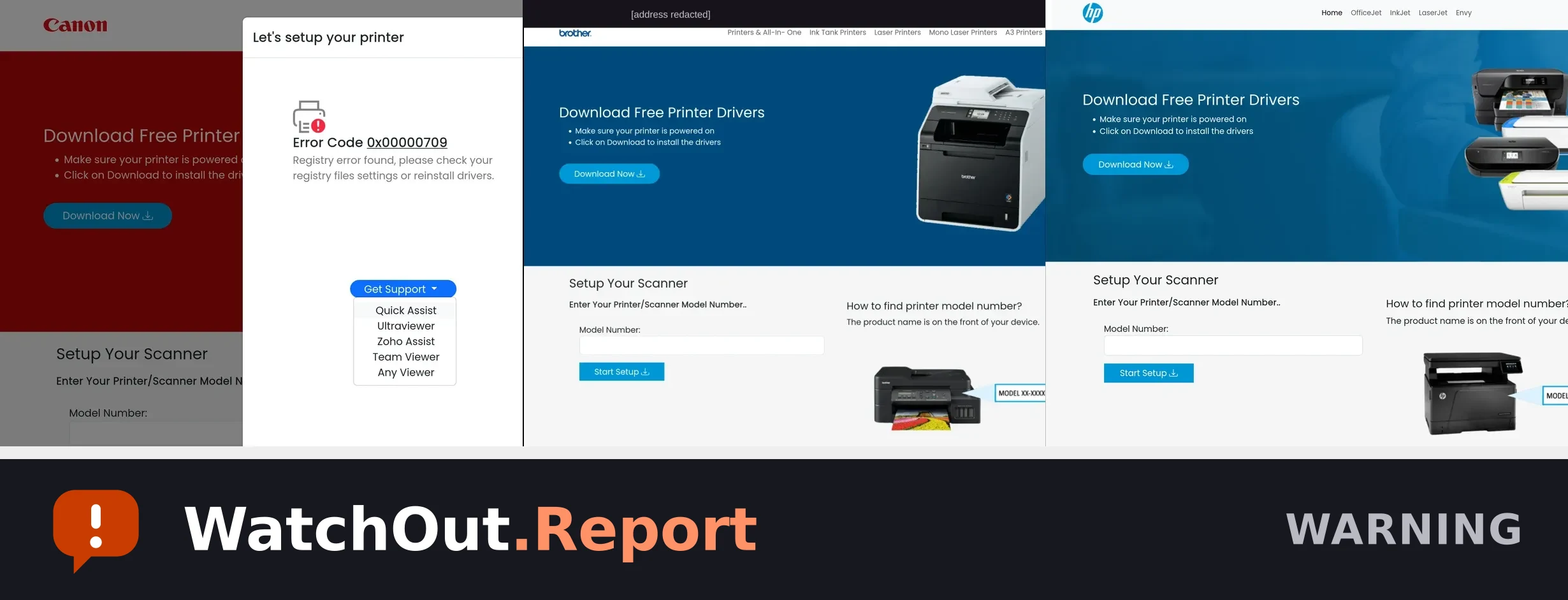
A printer-support page using printer-company branding shows an alarming error, asks you to download a driver, and offers remote-access tools. Do not download anything or let an unfamiliar person control your computer. Use the printer company's official website instead.
Warning signs
- An alarming printer error appears unexpectedly.
- The page asks you to download a driver from an unfamiliar address.
- The support menu offers tools that can let another person access your computer.
- A printer brand appears on a myprinter[.]live subdomain instead of its known official website.
Reported addresses
Written so they cannot be clicked. Do not retype them into your browser.
myprinter[.]livebrother[.]myprinter[.]livecanon[.]myprinter[.]live
Source and limitations — what this alert does not establish
- The supplied screenshots show Canon, Brother, and HP branding. The Canon screenshot shows a support menu listing remote-access tools; the images do not show whether a tool was installed or whether a remote session occurred.
- The Brother screenshot visibly shows brother[.]myprinter[.]live. The HP screenshot shows the same driver-download layout, but its address is not visible in the supplied image.
- Scammers may change the brand, subdomain, wording, or remote-access tool while using the same approach. Verify the current page before sharing a printed copy.
Published Aug 23, 2026. Published by the Cybersecurity Reach Foundation.
Send this to someone it could protect.